For the retro LAN I have a Shuttle XPC called usagi: Pentium 4 at 3.2 GHz, GeForce 7800 GTX, Windows XP. It's supposed to run the games from back then, in the right version, with the patch, and with the CD image in the virtual drive. Which means installers, copy protection, patches, drivers, broken save games. I didn't want to sit in front of it for hours clicking through setup dialogs. I wanted to see from my Mac what the machine was doing and let Claude Code do the fiddly work.
How I got here
It started small on 16 November 2026: one Python script on the XP box, another one on the Mac. The last Python that runs on XP is 3.4.4, so the server had to make do without anything newer. It could do four things: answer a ping, run a command, upload a file, download a file. I typed the password into a console window every time it started.
Remote control of windows came the same day. A screenshot tells a language model very little and costs a lot of tokens, but Windows knows every window and every button with its text, position and state. So xpctl ui reads the window tree and returns it as text, including a note when a window hangs or a button is greyed out. First test was Notepad: type some text, Alt+F4, hit "No" in the save dialog. Worked. Shortly after, Claude used it to install Unreal Tournament 2004, CD key typed straight into the input field.
From then on something new got added every day, whenever I needed it on the XP box. Hooking up Alcohol 120% so images get mounted. Backing up CDs as ISO, or as CUE/BIN when they have audio tracks. A database of the copy protection on my CDs (SafeDisc, SecuROM and friends), so I know up front whether an image will start at all. A version database for the installed games, so I can see where a patch is still missing.
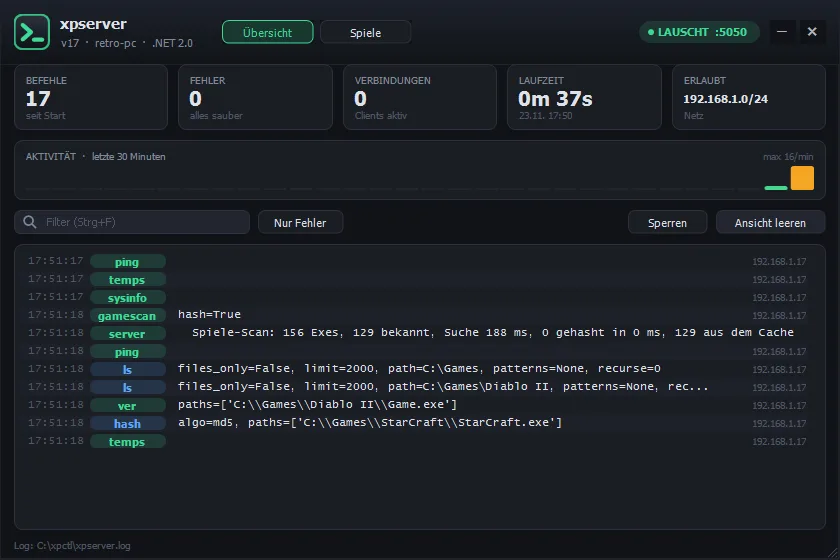
On 23 November I threw out the Python server and rebuilt it as a .NET 3.5 program. usagi already had .NET 3.5, and a single exe with a tray icon is a lot nicer than a console window. To make sure nothing broke in the move, I compared the answers of both servers field by field in 242 cases. Since I'm often sitting at the machine playing while this runs, the tray app never steals focus and shows no balloon tips while something runs fullscreen.
By now xpctl can also read and edit save games. I tripped over a few things on the way: Diablo II 1.14d doesn't save where the old registry value points anymore, it uses a new path. And Need for Speed Underground simply crashes when loading a profile if its config file holds a graphics combination the game can't handle. xpctl knows about both now.
How the control works
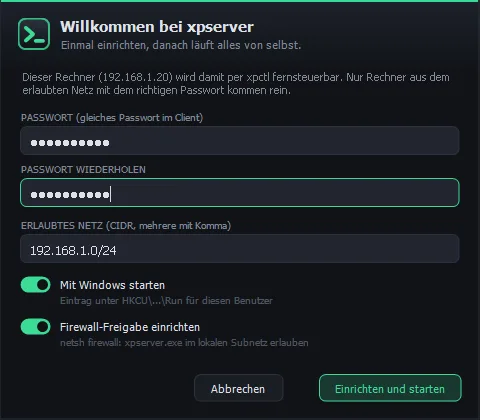
There are two parts. On the XP box runs xpserver.exe, a single file, no installation. On first start a dialog asks for a password and the allowed network, autostart and the firewall rule are already ticked. On the Mac (or Linux, or Windows) runs xpctl.py, a single Python script with no dependencies.
The two talk over TCP on port 5050. Every message starts with four bytes of length, followed by JSON, or for files the raw bytes in 256 KB chunks. On connect the server sends a random nonce, the client answers with an HMAC-SHA256 over password and nonce, and the server proves itself the same way in the other direction. So the password never goes over the wire. The rest isn't encrypted though, and anyone who knows the password can do anything on the XP box. That's why this belongs in your own LAN only, never on the internet. The server also only lets in addresses from the allowed network.
After login the client sends commands like {"op": "ps"} and gets one answer each. There are a good 50 of them by now. A typical install looks like this:
./xpctl.py ping                              # is the server up, which version?
./xpctl.py mount 'D:\Images\game.mds'         # image into the Alcohol drive
./xpctl.py install 'G:\setup.exe' 'C:\Games\Game'
./xpctl.py ui                                # which dialog is open right now?
./xpctl.py press --label "Weiter >"          # press a button, shows the next dialog
./xpctl.py shot                              # only if ui gives nothing useful
install recognises Inno Setup, NSIS and MSI and runs them silently, accepts the EULA of GOG installers automatically and reads the log afterwards. If that doesn't work, it's dialog by dialog with ui and press. I really only need shot for windows that draw themselves, so games and some installers. For that the server sends the pixels zlib-compressed and the client builds a PNG from them.
There are also commands for things that would otherwise be a run dir or run tasklist plus searching through the output: ls, cat, ps, kill, copy, hash. They return structured answers instead of console text you have to pick apart again. On top of that: reading the registry, system info, temperatures from ACPI, SMART and the NVIDIA card, setting NVIDIA vsync, installing drivers from an INF, sorting desktop icons into groups and tiling windows in a grid.
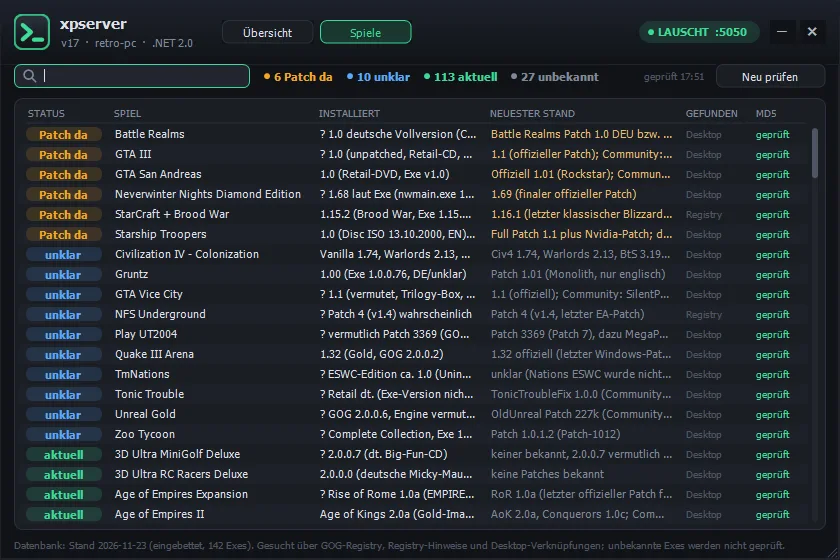
The "Spiele" (games) tab in the server window shows the installed and the latest version of every known game. It finds them via the GOG registry, registry hints and desktop shortcuts, and identifies them by file size first, then by MD5 in the background. On usagi with 156 executables the first run takes 2 seconds, every further run about 0.3.
The client handles updates itself: xpctl update sends the new exe, the server checks the checksum, renames itself to .bak and starts the new version. Only once that one is listening does the old one exit. If the new one doesn't come up within 30 seconds, it rolls back. A second, invisible process also keeps watch and restarts the server after a crash.
The UI and the output are in German for now, the docs in the repo are in English. The server is written in C# with WinForms, the client in Python 3.9+, MIT license.
GitHub | Client and all commands | Server, tray icon, configuration | Protocol | .NET Framework 3.5 (Microsoft)