Back in the Windows XP days there were desktop organizers that let you draw translucent, labelled boxes on the desktop and sort your icons into them. One double-click on the empty desktop and everything was gone. My desktop still ends up looking like it did before tidying up, so I rebuilt the idea for Windows 10 and 11.
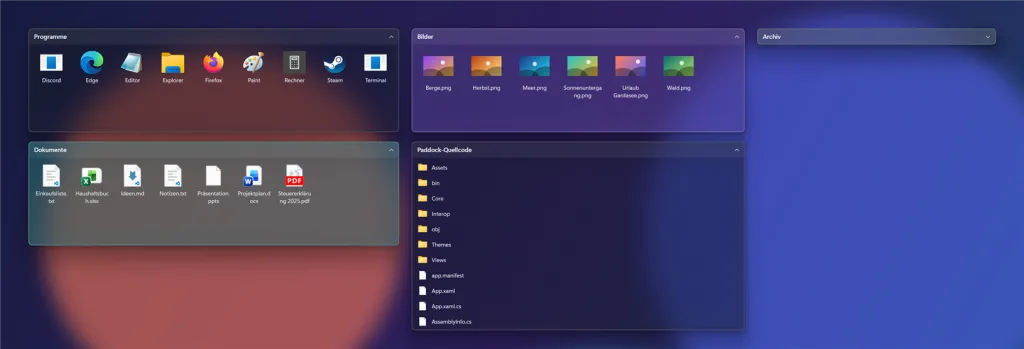
Paddock puts areas made of real acrylic glass straight onto the desktop. You draw them by dragging with the right mouse button, and icons underneath move right in. A click on the title rolls an area up, and hovering opens it again for a moment. Areas snap magnetically to screen edges and to each other, and an area can also just show an existing folder, like your downloads. Right-clicking a file brings up the real Explorer menu, drag and drop works in every direction, and new files on the desktop can be sorted into areas automatically by rules.
What mattered most to me is that it never gets in the way. The areas always stay below normal windows, never steal focus, do not show up in Alt+Tab and use no CPU while idle, because everything is event-driven and Windows computes the blur itself on the GPU. The look can be changed with JSON themes that reload live, and your own rules and menu commands plug in as .NET plugins. Built with C# and WPF, and GitHub Actions builds the MSI installer for every release automatically.