My new inverter offers a wide range of data points that I actively log. I explain how I read them out and process them.
The system pulls the CSV exports from the inverter daily via API, parses the data and writes it into InfluxDB. Grafana then shows production, revenue and peak power over time. The 5-minute values are enough for monitoring, the 1-second values I use for detailed analysis.
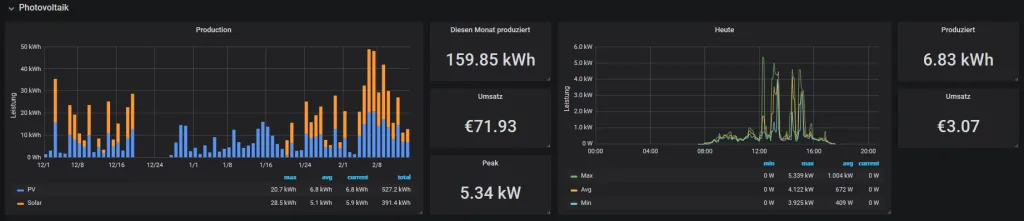
The dashboard shows the monthly production as bars on the left (PV vs Solar separated), monthly statistics in the middle (159.85 kWh produced, €71.93 revenue, 5.34 kW peak), and on the right the daily curve with current power and today's values (6.83 kWh, €3.07).
First steps with Modbus
Since the inverter supports Modbus, that was naturally my first attempt at getting to the data. With Python and pymodbus I wrote myself a small Modbus master service that queries around 20 data points every 10 seconds.
That ran pretty well for a few hours. But then I had to realize that the Modbus module gets switched off at night to save power. On top of that, Modbus wasn't nearly as reliable as I had thought. I think I overwhelmed the inverter a bit with the query speed.
A different solution is needed
A modern SMA inverter offers a web interface that displays the data in various charts. I thought maybe there's a public API for it, but unfortunately I couldn't find anything about it.
So I took a look at the traffic to the inverter through the browser's devtools.
At first I wanted to address the getValues endpoint, but I didn't know what the various parameters do. A request to getValues looks roughly like this:
POST /dyn/getValues.json?sid=xxxx
{"destDev":[],"keys":["6800_00A21E00","6800_00823400","6180_104A9A00","6180_104AB700","6180_084ABC00","6180_084A9600","6180_084A9800","6100_004AB600","6800_088A4D00","6180_084A6400"]}
Then I had the idea to automatically download the CSV export and process it.
There are 2 types of exports: daily data as 5-minute or 1-second values
Such an export consists of several CSV files that get packed into a .zip every night.
To get to the files there's the getFS endpoint.
POST /dyn/getFS.json?sid=xxx
{"destDev":[],"path":"/DIAGNOSE/ONLINE5M/"}
{
  "result": {
    "XXXX-XXXXXXXX": { // Some ID
      "\/DIAGNOSE\/ONLINE5M\/": [
        {
          "f": "DA190912.ZIP", // Filename
          "tm": 1568310258, // Timestamp
          "s": 32200 // File size
        },
        {
          "f": "DA190919.ZIP",
          "tm": 1568914216,
          "s": 32300
        },
        {
          "f": "DA190925.011",
          "tm": 1569429451,
          "s": 12006
        }
        ...
      ]
    }
  }
}
Now that I had all the names, I could simply download the files via curl.
curl -s -k -X POST -H "Content-Type: application/json" -d "{}" "https://xxx/fs/DIAGNOSE/ONLINE5M/DA190919.ZIP?sid=?sid=xxx" --output "DA190919.ZIP"
Links: